Log in
Password  Recover password

Register now!

Nickname

E-mail

Password

Confirm your password

(I agree the Terms of service)

What is
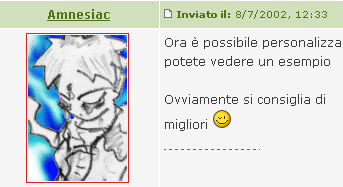
An avatar is a symbolic image used by users to represent themselves. Each avatar is displayed to the left of the user's messages which belongs and it is visible even in the User profile.
image

The avatar (highlighted in red) of the autor next to the sent message.


How to have an avatar
You can insert an avatar with the control panel Edit avatar. The available ways to choose which avatar to use are three:
  • Preinstalled avatars: you can choose from the list one of the avatars already present on ForumFree & ForumCommunity. To see a preview of the avatars, just select them and they will appear to the right of the list.

  • Avatar from URL: you can enter in the box the URL of an image already hosted on the web cthat yoou want to use as avatar.

  • Avatar from your computer: you can upload an image from your hard disk. To do so simply click on "Browse" and select the image. Remember that the image should not exceed 20 KB.
Once used one of the three ways listed above, to register the changes click on Edit Avatar.

Removing your avatar
You can remove your avatar by the menů Options -> Edit avatar, selecting the optionI don't want to use an avatar (remove all the set avatars) and registering the changes by clicking on Update my avatar.

Allowed extensions
The formats allowed are: .gif .jpeg .jpg e .png. Other file types, for example .swf, may be linked.

Maximum weight
20KB with upload form. No limit if the avatar is linked from another website.

Maximum size
They are 150x200 pixel for the user panel and 250x400 for that of moderators.

Limiting the avatars in your board
You can put a limit to the width of the displayed avatars on your board or hide them entirely with the administrative panel Manage avatars. In Manage groups, instead, you can hide the avatars of a specific group of users or show only them, if in the forum all users avatars are invisible.
The following solutions are atypical, nevertheless feasibles:
  • Limiting the avatars height
    In Manage avatars you can put a limit only to the width of the avatar, to act even upon the height go into Edit colours and styles and write
    CODICE
    .post .details [src] {max-height: 200px}

    the code does not work on Internet Explorer

  • Hide avatars only to visitors
    In Manage avatars you find the option. If you want even to limit the size of the avatar to the users, you can not use that panel, but go to Edit colors and styles and write
    CODICE
    .post .details [src] {max-width: 156px} .post .details {width: 160px; overflow: hidden}

Help

Doubts or problems with your forums? Don't worry! The service has a large collection of guides and an official support forum where you can get help.

Search engines

Our forums are in the top positions in all major search engines and receive thousands of visits daily.

Album

Upload images directly on your album. You can attach them to your messages and show them to your friends in a few steps.

Skin

Customize your forums instantly. Hundreds of graphic themes already available. You can ask for advice from other users in the Skin Lab, our official community of graphics.